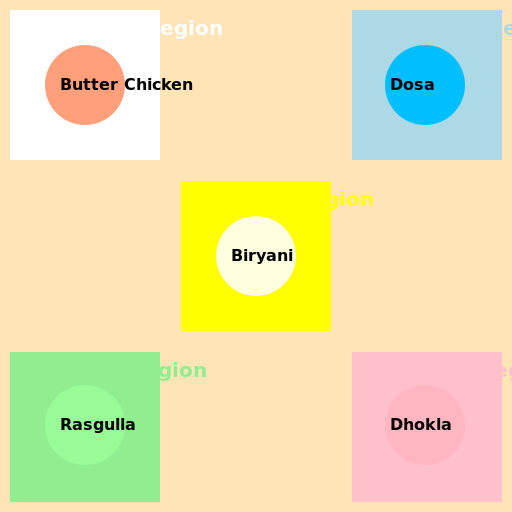

Javascript Code
                        // Regional Diversity of Food in India


// Define the canvas


// Get the 2d context


// Draw the Indian Map

ctx.fillStyle = '#FFE4B5'; // Set the fill color to Peachpuff

ctx.fillRect(0, 0, 512, 512); // Draw a rectangle as the background


// Draw the Northern Region

ctx.fillStyle = '#FFFFFF'; // Set the fill color to White

ctx.fillRect(10, 10, 150, 150); // Draw a rectangle for the Northern Region

ctx.font = 'bold 20px Arial'; // Set the font to bold 20px Arial

ctx.fillText('Northern Region', 35, 35); // Write the title for the Northern Region


// Draw the Southern Region

ctx.fillStyle = '#ADD8E6'; // Set the fill color to Light Blue

ctx.fillRect(352, 10, 150, 150); // Draw a rectangle for the Southern Region

ctx.font = 'bold 20px Arial'; // Set the font to bold 20px Arial

ctx.fillText('Southern Region', 377, 35); // Write the title for the Southern Region


// Draw the Eastern Region

ctx.fillStyle = '#90EE90'; // Set the fill color to Light Green

ctx.fillRect(10, 352, 150, 150); // Draw a rectangle for the Eastern Region

ctx.font = 'bold 20px Arial'; // Set the font to bold 20px Arial

ctx.fillText('Eastern Region', 35, 377); // Write the title for the Eastern Region


// Draw the Western Region

ctx.fillStyle = '#FFC0CB'; // Set the fill color to Pink

ctx.fillRect(352, 352, 150, 150); // Draw a rectangle for the Western Region

ctx.font = 'bold 20px Arial'; // Set the font to bold 20px Arial

ctx.fillText('Western Region', 377, 377); // Write the title for the Western Region


// Draw the Central Region

ctx.fillStyle = '#FFFF00'; // Set the fill color to Yellow

ctx.fillRect(181, 181, 150, 150); // Draw a rectangle for the Central Region

ctx.font = 'bold 20px Arial'; // Set the font to bold 20px Arial

ctx.fillText('Central Region', 206, 206); // Write the title for the Central Region


// Draw the Food Icons

ctx.fillStyle = '#FFA07A'; // Set the fill color to Light Salmon

ctx.beginPath(); // Start drawing the food icons

ctx.arc(85, 85, 40, 0, 2 * Math.PI); // Draw a circle for the Northern Region's food

ctx.fill(); // Fill the circle

ctx.fillStyle = '#00BFFF'; // Set the fill color to Deep Sky Blue

ctx.beginPath(); // Start drawing the food icons

ctx.arc(425, 85, 40, 0, 2 * Math.PI); // Draw a circle for the Southern Region's food

ctx.fill(); // Fill the circle

ctx.fillStyle = '#98FB98'; // Set the fill color to Pale Green

ctx.beginPath(); // Start drawing the food icons

ctx.arc(85, 425, 40, 0, 2 * Math.PI); // Draw a circle for the Eastern Region's food

ctx.fill(); // Fill the circle

ctx.fillStyle = '#FFB6C1'; // Set the fill color to Light Pink

ctx.beginPath(); // Start drawing the food icons

ctx.arc(425, 425, 40, 0, 2 * Math.PI); // Draw a circle for the Western Region's food

ctx.fill(); // Fill the circle

ctx.fillStyle = '#FFFFE0'; // Set the fill color to Light Yellow

ctx.beginPath(); // Start drawing the food icons

ctx.arc(256, 256, 40, 0, 2 * Math.PI); // Draw a circle for the Central Region's food

ctx.fill(); // Fill the circle


// Write the Food Names

ctx.fillStyle = '#000000'; // Set the fill color to Black

ctx.font = 'bold 16px Arial'; // Set the font to bold 16px Arial

ctx.fillText('Butter Chicken', 60, 90); // Write the Northern Region's food name

ctx.fillText('Dosa', 390, 90); // Write the Southern Region's food name

ctx.fillText('Rasgulla', 60, 430); // Write the Eastern Region's food name

ctx.fillText('Dhokla', 390, 430); // Write the Western Region's food name

ctx.fillText('Biryani', 231, 261); // Write the Central Region's food name


// Return the Canvas Commands


// "I hope you're hungry because this map is making me crave some Indian food!"
AI
Model: gpt-3.5-turbo-0301
Time: 48 seconds
Prompt Tokens: 183
Completion Tokens: 1057
Total Token Cost: 1240


 balloon party
 beautiful beach
 cute puppy dog
 happy cat
 house
house