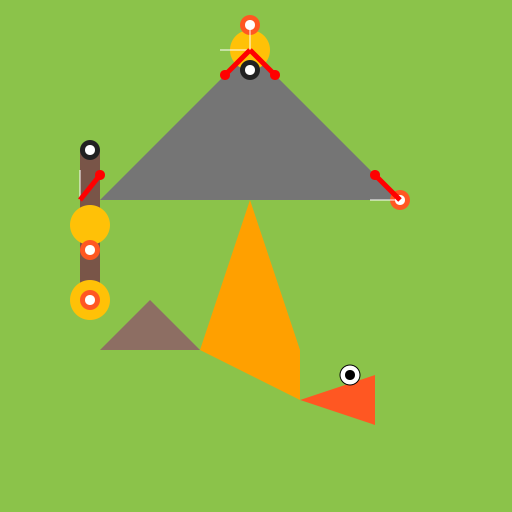

Javascript Code
                        // Dino Sword Battle

ctx.fillStyle = "#8BC34A"; // Set fill color to green

ctx.fillRect(0, 0, 512, 512); // Draw background


// Draw sword handle

ctx.fillStyle = "#795548"; // Set fill color to brown

ctx.fillRect(80, 150, 20, 150);


// Draw sword blade

ctx.beginPath(); // Start drawing path

ctx.moveTo(100, 200); // Move to starting point

ctx.lineTo(250, 50); // Draw line to tip of the blade

ctx.lineTo(400, 200); // Draw line to end of blade

ctx.closePath(); // Close path

ctx.fillStyle = "#757575"; // Set fill color to gray

ctx.fill(); // Fill shape


// Draw dinosaur body

ctx.beginPath(); // Start drawing path

ctx.moveTo(300, 350); // Move to starting point

ctx.lineTo(250, 200); // Draw line to top of leg

ctx.lineTo(200, 350); // Draw line to bottom of leg

ctx.lineTo(300, 400); // Draw line to end of body

ctx.closePath(); // Close path

ctx.fillStyle = "#FFA000"; // Set fill color to orange

ctx.fill(); // Fill shape


// Draw dinosaur head

ctx.beginPath(); // Start drawing path

ctx.moveTo(300, 400); // Move to starting point

ctx.lineTo(375, 375); // Draw line to top of head

ctx.lineTo(375, 425); // Draw line to bottom of head

ctx.closePath(); // Close path

ctx.fillStyle = "#FF5722"; // Set fill color to red

ctx.fill(); // Fill shape


// Draw dinosaur tail

ctx.beginPath(); // Start drawing path

ctx.moveTo(200, 350); // Move to starting point

ctx.lineTo(150, 300); // Draw line to top of tail

ctx.lineTo(100, 350); // Draw line to end of tail

ctx.closePath(); // Close path

ctx.fillStyle = "#8D6E63"; // Set fill color to dark brown

ctx.fill(); // Fill shape


// Draw dinosaur eye

ctx.beginPath(); // Start drawing path

ctx.arc(350, 375, 10, 0, 2 * Math.PI); // Draw circle for eye

ctx.fillStyle = "#FFFFFF"; // Set fill color to white

ctx.fill(); // Fill shape

ctx.strokeStyle = "#000000"; // Set stroke color to black

ctx.stroke(); // Draw stroke


// Draw dinosaur pupil

ctx.beginPath(); // Start drawing path

ctx.arc(350, 375, 5, 0, 2 * Math.PI); // Draw circle for pupil

ctx.fillStyle = "#000000"; // Set fill color to black

ctx.fill(); // Fill shape


// Draw sword hilt

ctx.beginPath(); // Start drawing path

ctx.arc(90, 225, 20, 0, 2 * Math.PI); // Draw circle for hilt

ctx.fillStyle = "#FFC107"; // Set fill color to yellow

ctx.fill(); // Fill shape


// Draw sword guard

ctx.beginPath(); // Start drawing path

ctx.arc(250, 50, 20, 0, 2 * Math.PI); // Draw circle for guard

ctx.fillStyle = "#FFC107"; // Set fill color to yellow

ctx.fill(); // Fill shape


// Draw sword handle decoration

ctx.beginPath(); // Start drawing path

ctx.arc(90, 250, 10, 0, 2 * Math.PI); // Draw circle for decoration

ctx.fillStyle = "#FF5722"; // Set fill color to red

ctx.fill(); // Fill shape


// Draw sword blade decoration

ctx.beginPath(); // Start drawing path

ctx.arc(250, 25, 10, 0, 2 * Math.PI); // Draw circle for decoration

ctx.fillStyle = "#FF5722"; // Set fill color to red

ctx.fill(); // Fill shape


// Draw sword tip decoration

ctx.beginPath(); // Start drawing path

ctx.arc(400, 200, 10, 0, 2 * Math.PI); // Draw circle for decoration

ctx.fillStyle = "#FF5722"; // Set fill color to red

ctx.fill(); // Fill shape


// Draw sword blade shine

ctx.beginPath(); // Start drawing path

ctx.moveTo(250, 50); // Move to starting point

ctx.lineTo(250, 20); // Draw line to shine

ctx.strokeStyle = "#FFFFFF"; // Set stroke color to white

ctx.stroke(); // Draw stroke


// Draw sword hilt shine

ctx.beginPath(); // Start drawing path

ctx.moveTo(80, 200); // Move to starting point

ctx.lineTo(80, 170); // Draw line to shine

ctx.strokeStyle = "#FFFFFF"; // Set stroke color to white

ctx.stroke(); // Draw stroke


// Draw sword guard shine

ctx.beginPath(); // Start drawing path

ctx.moveTo(250, 50); // Move to starting point

ctx.lineTo(220, 50); // Draw line to shine

ctx.strokeStyle = "#FFFFFF"; // Set stroke color to white

ctx.stroke(); // Draw stroke


// Draw sword tip shine

ctx.beginPath(); // Start drawing path

ctx.moveTo(400, 200); // Move to starting point

ctx.lineTo(370, 200); // Draw line to shine

ctx.strokeStyle = "#FFFFFF"; // Set stroke color to white

ctx.stroke(); // Draw stroke


// Draw sword handle decoration shine

ctx.beginPath(); // Start drawing path

ctx.arc(90, 250, 5, 0, 2 * Math.PI); // Draw circle for decoration shine

ctx.fillStyle = "#FFFFFF"; // Set fill color to white

ctx.fill(); // Fill shape


// Draw sword blade decoration shine

ctx.beginPath(); // Start drawing path

ctx.arc(250, 25, 5, 0, 2 * Math.PI); // Draw circle for decoration shine

ctx.fillStyle = "#FFFFFF"; // Set fill color to white

ctx.fill(); // Fill shape


// Draw sword tip decoration shine

ctx.beginPath(); // Start drawing path

ctx.arc(400, 200, 5, 0, 2 * Math.PI); // Draw circle for decoration shine

ctx.fillStyle = "#FFFFFF"; // Set fill color to white

ctx.fill(); // Fill shape


// Draw sword handle grip

ctx.beginPath(); // Start drawing path

ctx.arc(90, 150, 10, 0, 2 * Math.PI); // Draw circle for grip

ctx.fillStyle = "#212121"; // Set fill color to black

ctx.fill(); // Fill shape


// Draw sword handle grip shine

ctx.beginPath(); // Start drawing path

ctx.arc(90, 150, 5, 0, 2 * Math.PI); // Draw circle for grip shine

ctx.fillStyle = "#FFFFFF"; // Set fill color to white

ctx.fill(); // Fill shape


// Draw sword guard grip

ctx.beginPath(); // Start drawing path

ctx.arc(250, 70, 10, 0, 2 * Math.PI); // Draw circle for grip

ctx.fillStyle = "#212121"; // Set fill color to black

ctx.fill(); // Fill shape


// Draw sword guard grip shine

ctx.beginPath(); // Start drawing path

ctx.arc(250, 70, 5, 0, 2 * Math.PI); // Draw circle for grip shine

ctx.fillStyle = "#FFFFFF"; // Set fill color to white

ctx.fill(); // Fill shape


// Draw sword pommel

ctx.beginPath(); // Start drawing path

ctx.arc(90, 300, 20, 0, 2 * Math.PI); // Draw circle for pommel

ctx.fillStyle = "#FFC107"; // Set fill color to yellow

ctx.fill(); // Fill shape


// Draw sword pommel decoration

ctx.beginPath(); // Start drawing path

ctx.arc(90, 300, 10, 0, 2 * Math.PI); // Draw circle for pommel decoration

ctx.fillStyle = "#FF5722"; // Set fill color to red

ctx.fill(); // Fill shape


// Draw sword pommel shine

ctx.beginPath(); // Start drawing path

ctx.arc(90, 300, 5, 0, 2 * Math.PI); // Draw circle for pommel shine

ctx.fillStyle = "#FFFFFF"; // Set fill color to white

ctx.fill(); // Fill shape


// Draw sword blade blood

ctx.beginPath(); // Start drawing path

ctx.moveTo(250, 50); // Move to starting point

ctx.lineTo(275, 75); // Draw line to blood

ctx.strokeStyle = "#FF0000"; // Set stroke color to red

ctx.lineWidth = 5; // Set line width to 5

ctx.stroke(); // Draw stroke


// Draw sword hilt blood

ctx.beginPath(); // Start drawing path

ctx.moveTo(80, 200); // Move to starting point

ctx.lineTo(100, 175); // Draw line to blood

ctx.strokeStyle = "#FF0000"; // Set stroke color to red

ctx.lineWidth = 5; // Set line width to 5

ctx.stroke(); // Draw stroke


// Draw sword guard blood

ctx.beginPath(); // Start drawing path

ctx.moveTo(250, 50); // Move to starting point

ctx.lineTo(225, 75); // Draw line to blood

ctx.strokeStyle = "#FF0000"; // Set stroke color to red

ctx.lineWidth = 5; // Set line width to 5

ctx.stroke(); // Draw stroke


// Draw sword tip blood

ctx.beginPath(); // Start drawing path

ctx.moveTo(400, 200); // Move to starting point

ctx.lineTo(375, 175); // Draw line to blood

ctx.strokeStyle = "#FF0000"; // Set stroke color to red

ctx.lineWidth = 5; // Set line width to 5

ctx.stroke(); // Draw stroke


// Draw sword blade blood drip

ctx.beginPath(); // Start drawing path

ctx.arc(275, 75, 5, 0, 2 * Math.PI); // Draw circle for blood drip

ctx.fillStyle = "#FF0000"; // Set fill color to red

ctx.fill(); // Fill shape


// Draw sword hilt blood drip

ctx.beginPath(); // Start drawing path

ctx.arc(100, 175, 5, 0, 2 * Math.PI); // Draw circle for blood drip

ctx.fillStyle = "#FF0000"; // Set fill color to red

ctx.fill(); // Fill shape


// Draw sword guard blood drip

ctx.beginPath(); // Start drawing path

ctx.arc(225, 75, 5, 0, 2 * Math.PI); // Draw circle for blood drip

ctx.fillStyle = "#FF0000"; // Set fill color to red

ctx.fill(); // Fill shape


// Draw sword tip blood drip

ctx.beginPath(); // Start drawing path

ctx.arc(375, 175, 5, 0, 2 * Math.PI); // Draw circle for blood drip

ctx.fillStyle = "#FF0000"; // Set fill color to red

ctx.fill(); // Fill shape


// Haha, dino didn't stand a chance!
AI
Model: gpt-3.5-turbo-0301
Time: 107 seconds
Prompt Tokens: 181
Completion Tokens: 2354
Total Token Cost: 2535


 balloon party
 beautiful beach
 cute puppy dog
 happy cat
 house
house