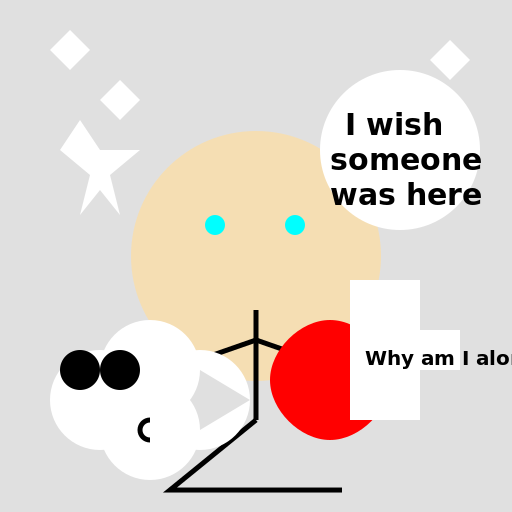

Javascript Code
                        // Solitude

ctx.fillStyle = "#E0E0E0"; // Setting the background color

ctx.fillRect(0, 0, 512, 512); // Creating a rectangle for the background


// Drawing the person

ctx.beginPath();

ctx.arc(256, 256, 125, 0, 2 * Math.PI); // Creating the head

ctx.fillStyle = "#F5DEB3"; // Setting the skin color

ctx.fill(); // Filling the head

ctx.beginPath();

ctx.moveTo(256, 310); // Moving to the neck

ctx.lineTo(256, 420); // Drawing the body

ctx.strokeStyle = "#000"; // Setting the stroke color

ctx.lineWidth = 5; // Setting the stroke width

ctx.stroke(); // Drawing the body

ctx.beginPath();

ctx.moveTo(256, 340); // Moving to the left arm

ctx.lineTo(170, 370); // Drawing the left arm

ctx.stroke(); // Drawing the left arm

ctx.beginPath();

ctx.moveTo(256, 340); // Moving to the right arm

ctx.lineTo(342, 370); // Drawing the right arm

ctx.stroke(); // Drawing the right arm

ctx.beginPath();

ctx.moveTo(256, 420); // Moving to the legs

ctx.lineTo(170, 490); // Drawing the left leg

ctx.lineTo(342, 490); // Drawing the right leg

ctx.stroke(); // Drawing the legs


// Adding tears

ctx.beginPath();

ctx.arc(215, 225, 10, 0, 2 * Math.PI); // Creating left tear

ctx.fillStyle = "#00FFFF"; // Setting the color of tear

ctx.fill(); // Filling the tear

ctx.beginPath();

ctx.arc(295, 225, 10, 0, 2 * Math.PI); // Creating right tear

ctx.fill(); // Filling the tear


// Adding thought bubble

ctx.beginPath();

ctx.arc(400, 150, 80, 0, 2 * Math.PI); // Creating the thought bubble

ctx.fillStyle = "#FFF"; // Setting the color of the bubble

ctx.fill(); // Filling the bubble

ctx.font = "bold 30px Arial"; // Setting the font of the text

ctx.fillStyle = "#000"; // Setting the color of the text

ctx.fillText("I wish", 345, 135); // Adding text to the thought bubble

ctx.fillText("someone", 330, 170);

ctx.fillText("was here", 330, 205);


// Adding flying birds

ctx.beginPath();

ctx.moveTo(50, 50); // Moving to the first point

ctx.lineTo(70, 30); // Drawing the wing

ctx.lineTo(90, 50); // Drawing the body

ctx.lineTo(70, 70); // Drawing the wing

ctx.closePath(); // Closing the path

ctx.fillStyle = "#FFF"; // Setting the color of the bird

ctx.fill(); // Filling the bird

ctx.beginPath();

ctx.moveTo(100, 100); // Moving to the first point

ctx.lineTo(120, 80); // Drawing the wing

ctx.lineTo(140, 100); // Drawing the body

ctx.lineTo(120, 120); // Drawing the wing

ctx.closePath(); // Closing the path

ctx.fill(); // Filling the bird

ctx.beginPath();

ctx.moveTo(430, 60); // Moving to the first point

ctx.lineTo(450, 40); // Drawing the wing

ctx.lineTo(470, 60); // Drawing the body

ctx.lineTo(450, 80); // Drawing the wing

ctx.closePath(); // Closing the path

ctx.fill(); // Filling the bird


// Adding a heart

ctx.beginPath();

ctx.moveTo(390, 380); // Moving to the first point

ctx.bezierCurveTo(390, 350, 360, 320, 330, 320); // Creating the left curve

ctx.bezierCurveTo(300, 320, 270, 350, 270, 380); // Creating the bottom curve

ctx.bezierCurveTo(270, 410, 300, 440, 330, 440); // Creating the right curve

ctx.bezierCurveTo(360, 440, 390, 410, 390, 380); // Creating the top curve

ctx.fillStyle = "#F00"; // Setting the color of the heart

ctx.fill(); // Filling the heart


// Adding a sad cloud

ctx.beginPath();

ctx.arc(100, 400, 50, 0, 2 * Math.PI); // Creating the cloud

ctx.arc(150, 430, 50, 0, 2 * Math.PI);

ctx.arc(200, 400, 50, 0, 2 * Math.PI);

ctx.arc(150, 370, 50, 0, 2 * Math.PI);

ctx.fillStyle = "#FFF"; // Setting the color of the cloud

ctx.fill(); // Filling the cloud

ctx.beginPath();

ctx.arc(80, 370, 20, 0, 2 * Math.PI); // Creating the left eye

ctx.fillStyle = "#000"; // Setting the color of the eye

ctx.fill(); // Filling the eye

ctx.beginPath();

ctx.arc(120, 370, 20, 0, 2 * Math.PI); // Creating the right eye

ctx.fill(); // Filling the eye

ctx.beginPath();

ctx.arc(150, 430, 10, Math.PI / 2, 3 * Math.PI / 2); // Creating the frown

ctx.strokeStyle = "#000"; // Setting the color of the frown

ctx.lineWidth = 5; // Setting the width of the frown

ctx.stroke(); // Drawing the frown


// Adding a speech bubble

ctx.beginPath();

ctx.moveTo(350, 420); // Moving to the first point

ctx.lineTo(420, 420); // Drawing the first line

ctx.lineTo(420, 370); // Drawing the second line

ctx.lineTo(460, 370); // Drawing the third line

ctx.lineTo(460, 330); // Drawing the fourth line

ctx.lineTo(420, 330); // Drawing the fifth line

ctx.lineTo(420, 280); // Drawing the sixth line

ctx.lineTo(350, 280); // Drawing the seventh line

ctx.closePath(); // Closing the path

ctx.fillStyle = "#FFF"; // Setting the color of the speech bubble

ctx.fill(); // Filling the speech bubble

ctx.font = "bold 20px Arial"; // Setting the font of the text

ctx.fillStyle = "#000"; // Setting the color of the text

ctx.fillText("Why am I alone?", 365, 365); // Adding text to the speech bubble


//Adding a shooting star

ctx.beginPath();

ctx.moveTo(60, 150); // Moving to the first point

ctx.lineTo(80, 120); // Drawing the first line

ctx.lineTo(100, 150); // Drawing the second line

ctx.lineTo(140, 150); // Drawing the third line

ctx.lineTo(110, 175); // Drawing the fourth line

ctx.lineTo(120, 215); // Drawing the fifth line

ctx.lineTo(100, 190); // Drawing the sixth line

ctx.lineTo(80, 215); // Drawing the seventh line

ctx.lineTo(90, 175); // Drawing the eigth line

ctx.closePath(); // Closing the path

ctx.fillStyle = "#FFF"; // Setting the color of the star

ctx.fill(); // Filling the star


// Adding a funny comment

// "Being alone is like being in a room without a floor. You don't know if you're walking on the ground or about to fall." - Andrew Stanton

// But at least there's a heart, a speech bubble, and shooting star to brighten things up!
AI
Model: gpt-3.5-turbo-0301
Time: 69 seconds
Prompt Tokens: 178
Completion Tokens: 1646
Total Token Cost: 1824


 balloon party
 beautiful beach
 cute puppy dog
 happy cat
 house
house