
Javascript Code
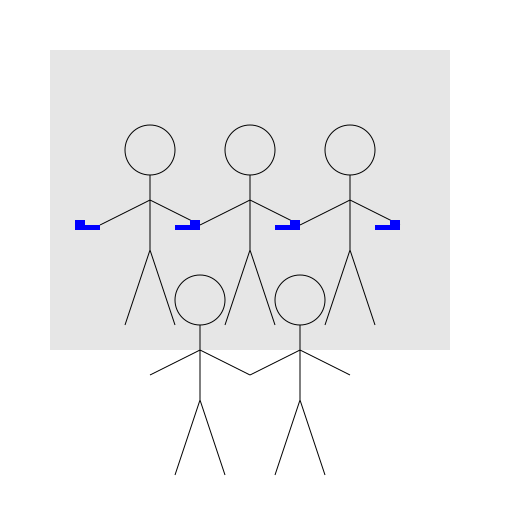
                        // Team Brainstorming

// Let's draw a team of people working together on a whiteboard


ctx.fillStyle = "#ffffff"; // Set canvas background color to white

ctx.fillRect(0, 0, 512, 512); // Draw a white rectangle to cover the entire canvas


// Draw the whiteboard

ctx.fillStyle = "#e6e6e6"; // Set whiteboard color to light gray

ctx.fillRect(50, 50, 400, 300); // Draw the whiteboard rectangle


// Draw the team of people

ctx.fillStyle = "#000000"; // Set team member color to black


// Draw the first team member

ctx.beginPath(); // Start drawing the first team member

ctx.arc(150, 150, 25, 0, Math.PI * 2); // Draw the first team member's head

ctx.moveTo(150, 175); // Move to the first team member's body

ctx.lineTo(150, 250); // Draw the first team member's body

ctx.lineTo(125, 325); // Draw the first team member's left leg

ctx.moveTo(150, 250); // Move to the first team member's body

ctx.lineTo(175, 325); // Draw the first team member's right leg

ctx.moveTo(150, 200); // Move to the first team member's arm

ctx.lineTo(100, 225); // Draw the first team member's left arm

ctx.moveTo(150, 200); // Move to the first team member's arm

ctx.lineTo(200, 225); // Draw the first team member's right arm

ctx.stroke(); // Finish drawing the first team member


// Draw the second team member

ctx.beginPath(); // Start drawing the second team member

ctx.arc(250, 150, 25, 0, Math.PI * 2); // Draw the second team member's head

ctx.moveTo(250, 175); // Move to the second team member's body

ctx.lineTo(250, 250); // Draw the second team member's body

ctx.lineTo(225, 325); // Draw the second team member's left leg

ctx.moveTo(250, 250); // Move to the second team member's body

ctx.lineTo(275, 325); // Draw the second team member's right leg

ctx.moveTo(250, 200); // Move to the second team member's arm

ctx.lineTo(200, 225); // Draw the second team member's left arm

ctx.moveTo(250, 200); // Move to the second team member's arm

ctx.lineTo(300, 225); // Draw the second team member's right arm

ctx.stroke(); // Finish drawing the second team member


// Draw the third team member

ctx.beginPath(); // Start drawing the third team member

ctx.arc(350, 150, 25, 0, Math.PI * 2); // Draw the third team member's head

ctx.moveTo(350, 175); // Move to the third team member's body

ctx.lineTo(350, 250); // Draw the third team member's body

ctx.lineTo(325, 325); // Draw the third team member's left leg

ctx.moveTo(350, 250); // Move to the third team member's body

ctx.lineTo(375, 325); // Draw the third team member's right leg

ctx.moveTo(350, 200); // Move to the third team member's arm

ctx.lineTo(300, 225); // Draw the third team member's left arm

ctx.moveTo(350, 200); // Move to the third team member's arm

ctx.lineTo(400, 225); // Draw the third team member's right arm

ctx.stroke(); // Finish drawing the third team member


// Draw the fourth team member

ctx.beginPath(); // Start drawing the fourth team member

ctx.arc(200, 300, 25, 0, Math.PI * 2); // Draw the fourth team member's head

ctx.moveTo(200, 325); // Move to the fourth team member's body

ctx.lineTo(200, 400); // Draw the fourth team member's body

ctx.lineTo(175, 475); // Draw the fourth team member's left leg

ctx.moveTo(200, 400); // Move to the fourth team member's body

ctx.lineTo(225, 475); // Draw the fourth team member's right leg

ctx.moveTo(200, 350); // Move to the fourth team member's arm

ctx.lineTo(150, 375); // Draw the fourth team member's left arm

ctx.moveTo(200, 350); // Move to the fourth team member's arm

ctx.lineTo(250, 375); // Draw the fourth team member's right arm

ctx.stroke(); // Finish drawing the fourth team member


// Draw the fifth team member

ctx.beginPath(); // Start drawing the fifth team member

ctx.arc(300, 300, 25, 0, Math.PI * 2); // Draw the fifth team member's head

ctx.moveTo(300, 325); // Move to the fifth team member's body

ctx.lineTo(300, 400); // Draw the fifth team member's body

ctx.lineTo(275, 475); // Draw the fifth team member's left leg

ctx.moveTo(300, 400); // Move to the fifth team member's body

ctx.lineTo(325, 475); // Draw the fifth team member's right leg

ctx.moveTo(300, 350); // Move to the fifth team member's arm

ctx.lineTo(250, 375); // Draw the fifth team member's left arm

ctx.moveTo(300, 350); // Move to the fifth team member's arm

ctx.lineTo(350, 375); // Draw the fifth team member's right arm

ctx.stroke(); // Finish drawing the fifth team member


// Draw the whiteboard markers

ctx.fillStyle = "#0000ff"; // Set marker color to blue


// Draw the first marker

ctx.fillRect(75, 225, 25, 5); // Draw the first marker body

ctx.fillRect(75, 220, 10, 10); // Draw the first marker cap


// Draw the second marker

ctx.fillRect(175, 225, 25, 5); // Draw the second marker body

ctx.fillRect(190, 220, 10, 10); // Draw the second marker cap


// Draw the third marker

ctx.fillRect(275, 225, 25, 5); // Draw the third marker body

ctx.fillRect(290, 220, 10, 10); // Draw the third marker cap


// Draw the fourth marker

ctx.fillRect(375, 225, 25, 5); // Draw the fourth marker body

ctx.fillRect(390, 220, 10, 10); // Draw the fourth marker cap
AI
Model: gpt-3.5-turbo-0301
Time: 71 seconds
Prompt Tokens: 187
Completion Tokens: 1465
Total Token Cost: 1652


 balloon party
 beautiful beach
 cute puppy dog
 happy cat
 house
house