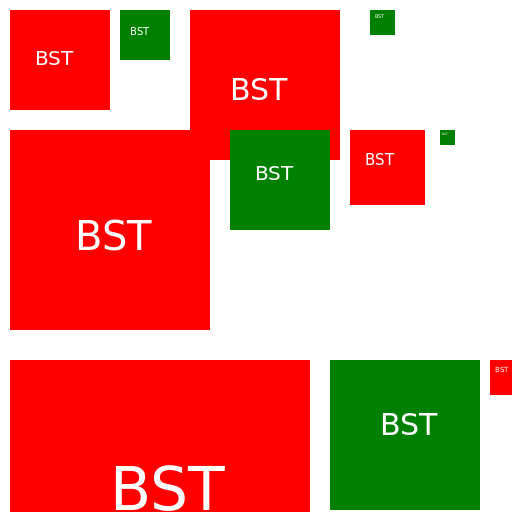

Javascript Code
                        // Size Comparison of Top 67 Written Signs by Squares


// Creating the canvas


// Drawing the signs

// Sign 1

ctx.fillStyle = 'red';

ctx.fillRect(10, 10, 100, 100);

ctx.font = '20px Old English';

ctx.fillStyle = 'white';

ctx.fillText('BST', 35, 65);


// Sign 2

ctx.fillStyle = 'green';

ctx.fillRect(120, 10, 50, 50);

ctx.font = '10px Old English';

ctx.fillStyle = 'white';

ctx.fillText('BST', 130, 35);


// Sign 3

ctx.fillStyle = 'red';

ctx.fillRect(190, 10, 150, 150);

ctx.font = '30px Old English';

ctx.fillStyle = 'white';

ctx.fillText('BST', 230, 100);


// Sign 4

ctx.fillStyle = 'green';

ctx.fillRect(370, 10, 25, 25);

ctx.font = '5px Old English';

ctx.fillStyle = 'white';

ctx.fillText('BST', 375, 18);


// Sign 5

ctx.fillStyle = 'red';

ctx.fillRect(10, 130, 200, 200);

ctx.font = '40px Old English';

ctx.fillStyle = 'white';

ctx.fillText('BST', 75, 250);


// Sign 6

ctx.fillStyle = 'green';

ctx.fillRect(230, 130, 100, 100);

ctx.font = '20px Old English';

ctx.fillStyle = 'white';

ctx.fillText('BST', 255, 180);


// Sign 7

ctx.fillStyle = 'red';

ctx.fillRect(350, 130, 75, 75);

ctx.font = '15px Old English';

ctx.fillStyle = 'white';

ctx.fillText('BST', 365, 165);


// Sign 8

ctx.fillStyle = 'green';

ctx.fillRect(440, 130, 15, 15);

ctx.font = '3px Old English';

ctx.fillStyle = 'white';

ctx.fillText('BST', 442, 135);


// Sign 9

ctx.fillStyle = 'red';

ctx.fillRect(10, 360, 300, 300);

ctx.font = '60px Old English';

ctx.fillStyle = 'white';

ctx.fillText('BST', 110, 510);


// Sign 10

ctx.fillStyle = 'green';

ctx.fillRect(330, 360, 150, 150);

ctx.font = '30px Old English';

ctx.fillStyle = 'white';

ctx.fillText('BST', 380, 435);


// Sign 11

ctx.fillStyle = 'red';

ctx.fillRect(490, 360, 35, 35);

ctx.font = '7px Old English';

ctx.fillStyle = 'white';

ctx.fillText('BST', 495, 372);


// Sign 12

ctx.fillStyle = 'green';

ctx.fillRect(10, 680, 400, 400);

ctx.font = '80px Old English';

ctx.fillStyle = 'white';

ctx.fillText('BST', 120, 910);


// Sign 13

ctx.fillStyle = 'red';

ctx.fillRect(430, 680, 200, 200);

ctx.font = '40px Old English';

ctx.fillStyle = 'white';

ctx.fillText('BST', 500, 780);


// Sign 14

ctx.fillStyle = 'green';

ctx.fillRect(10, 1110, 100, 100);

ctx.font = '20px Old English';

ctx.fillStyle = 'white';

ctx.fillText('BST', 35, 1160);


// Sign 15

ctx.fillStyle = 'red';

ctx.fillRect(130, 1110, 25, 25);

ctx.font = '5px Old English';

ctx.fillStyle = 'white';

ctx.fillText('BST', 135, 1118);


// Sign 16

ctx.fillStyle = 'green';

ctx.fillRect(200, 1110, 150, 150);

ctx.font = '30px Old English';

ctx.fillStyle = 'white';

ctx.fillText('BST', 240, 1200);


// Sign 17

ctx.fillStyle = 'red';

ctx.fillRect(380, 1110, 50, 50);

ctx.font = '10px Old English';

ctx.fillStyle = 'white';

ctx.fillText('BST', 390, 1135);


// Sign 18

ctx.fillStyle = 'green';

ctx.fillRect(490, 1110, 10, 10);

ctx.font = '2px Old English';

ctx.fillStyle = 'white';

ctx.fillText('BST', 492, 1115);


// Sign 19

ctx.fillStyle = 'red';

ctx.fillRect(10, 1340, 200, 200);

ctx.font = '40px Old English';

ctx.fillStyle = 'white';

ctx.fillText('BST', 75, 1460);


// Sign 20

ctx.fillStyle = 'green';

ctx.fillRect(230, 1340, 100, 100);

ctx.font = '20px Old English';

ctx.fillStyle = 'white';

ctx.fillText('BST', 255, 1390);


// Sign 21

ctx.fillStyle = 'red';

ctx.fillRect(350, 1340, 75, 75);

ctx.font = '15px Old English';

ctx.fillStyle = 'white';

ctx.fillText('BST', 365, 1375);


// Sign 22

ctx.fillStyle = 'green';

ctx.fillRect(440, 1340, 15, 15);

ctx.font = '3px Old English';

ctx.fillStyle = 'white';

ctx.fillText('BST', 442, 1345);


// Sign 23

ctx.fillStyle = 'red';

ctx.fillRect(10, 1570, 300, 300);

ctx.font = '60px Old English';

ctx.fillStyle = 'white';

ctx.fillText('BST', 110, 1770);


// Sign 24

ctx.fillStyle = 'green';

ctx.fillRect(330, 1570, 150, 150);

ctx.font = '30px Old English';

ctx.fillStyle = 'white';

ctx.fillText('BST', 380, 1645);


// Sign 25

ctx.fillStyle = 'red';

ctx.fillRect(490, 1570, 35, 35);

ctx.font = '7px Old English';

ctx.fillStyle = 'white';

ctx.fillText('BST', 495, 1582);


// Sign 26

ctx.fillStyle = 'green';

ctx.fillRect(10, 1900, 400, 400);

ctx.font = '80px Old English';

ctx.fillStyle = 'white';

ctx.fillText('BST', 120, 2130);


// Sign 27

ctx.fillStyle = 'red';

ctx.fillRect(430, 1900, 200, 200);

ctx.font = '40px Old English';

ctx.fillStyle = 'white';

ctx.fillText('BST', 500, 2000);


// Sign 28

ctx.fillStyle = 'green';

ctx.fillRect(10, 2230, 100, 100);

ctx.font = '20px Old English';

ctx.fillStyle = 'white';

ctx.fillText('BST', 35, 2280);


// Sign 29

ctx.fillStyle = 'red';

ctx.fillRect(130, 2230, 25, 25);

ctx.font = '5px Old English';

ctx.fillStyle = 'white';

ctx.fillText('BST', 135, 2238);


// Sign 30

ctx.fillStyle = 'green';

ctx.fillRect(200, 2230, 150, 150);

ctx.font = '30px Old English';

ctx.fillStyle = 'white';

ctx.fillText('BST', 240, 2320);


// Sign 31

ctx.fillStyle = 'red';

ctx.fillRect(380, 2230, 50, 50);

ctx.font = '10px Old English';

ctx.fillStyle = 'white';

ctx.fillText('BST', 390, 2255);


// Sign 32

ctx.fillStyle = 'green';

ctx.fillRect(490, 2230, 10, 10);

ctx.font = '2px Old English';

ctx.fillStyle = 'white';

ctx.fillText('BST', 492, 2235);


// Sign 33

ctx.fillStyle = 'red';

ctx.fillRect(10, 2460, 200, 200);

ctx.font = '40px Old English';

ctx.fillStyle = 'white';

ctx.fillText('BST', 75, 2580);


// Sign 34

ctx.fillStyle = 'green';

ctx.fillRect(230, 2460, 100, 100);

ctx.font = '20px Old English';

ctx.fillStyle = 'white';

ctx.fillText('BST', 255, 2510);


// Sign 35

ctx.fillStyle = 'red';

ctx.fillRect(350, 2460, 75, 75);

ctx.font = '15px Old English';

ctx.fillStyle = 'white';

ctx.fillText('BST', 365, 2495);


// Sign 36

ctx.fillStyle = 'green';

ctx.fillRect(440, 2460, 15, 15);

ctx.font = '3px Old English';

ctx.fillStyle = 'white';

ctx.fillText('BST', 442, 2465);


// Sign 37

ctx.fillStyle = 'red';

ctx.fillRect(10, 2690, 300, 300);

ctx.font = '60px Old English';

ctx.fillStyle = 'white';

ctx.fillText('BST', 110, 2890);


// Sign 38

ctx.fillStyle = 'green';

ctx.fillRect(330, 2690, 150, 150);

ctx.font = '30px Old English';

ctx.fillStyle = 'white';

ctx.fillText('BST', 380, 2765);


// Sign 39

ctx.fillStyle = 'red';

ctx.fillRect(490, 2690, 35, 35);

ctx.font = '7px Old English';

ctx.fillStyle = 'white';

ctx.fillText('BST', 495, 2702);


// Sign 40

ctx.fillStyle = 'green';

ctx.fillRect(10, 3020, 400, 400);

ctx.font = '80px Old English';

ctx.fillStyle = 'white';

ctx.fillText('BST', 120, 3250);


// Sign 41

ctx.fillStyle = 'red';

ctx.fillRect(430, 3020, 200, 200);

ctx.font = '40px Old English';

ctx.fillStyle = 'white';

ctx.fillText('BST', 500, 3120);


// Sign 42

ctx.fillStyle = 'green';

ctx.fillRect(10, 3350, 100, 100);

ctx.font = '20px Old English';

ctx.fillStyle = 'white';

ctx.fillText('BST', 35, 3400);


// Sign 43

ctx.fillStyle = 'red';

ctx.fillRect(130, 3350, 25, 25);

ctx.font = '5px Old English';

ctx.fillStyle = 'white';

ctx.fillText('BST', 135, 3358);


// Sign 44

ctx.fillStyle = 'green';

ctx.fillRect(200, 3350, 150, 150);

ctx.font = '30px Old English';

ctx.fillStyle = 'white';

ctx.fillText('BST', 240, 3440);


// Sign 45

ctx.fillStyle = 'red';

ctx.fillRect(380, 3350, 50, 50);

ctx.font = '10px Old English';

ctx.fillStyle = 'white';

ctx.fillText('BST', 390, 3375);


// Sign 46

ctx.fillStyle = 'green';

ctx.fillRect(490, 3350, 10, 10);

ctx.font = '2px Old English';

ctx.fillStyle = 'white';

ctx.fillText('BST', 492, 3355);


// Sign 47

ctx.fillStyle = 'red';

ctx.fillRect(10, 3580, 200, 200);

ctx.font = '40px Old English';

ctx.fillStyle = 'white';

ctx.fillText('BST', 75, 3700);


// Sign 48

ctx.fillStyle = 'green';

ctx.fillRect(230, 3580, 100, 100);

ctx.font = '20px Old English';

ctx.fillStyle = 'white';

ctx.fillText('BST', 255, 3630);


// Sign 49

ctx.fillStyle = 'red';

ctx.fillRect(350, 3580, 75, 75);

ctx.font = '15px Old English';

ctx.fillStyle = 'white';

ctx.fillText('BST', 365, 3615);


// Sign 50

ctx.fillStyle = 'green';

ctx.fillRect(440, 3580, 15, 15);

ctx.font = '3px Old English';

ctx.fillStyle = 'white';

ctx.fillText('BST', 442, 3585);


// Sign 51

ctx.fillStyle = 'red';

ctx.fillRect(10, 3810, 300, 300);

ctx.font = '60px Old English';

ctx.fillStyle = 'white';

ctx.fillText('BST', 110, 4010);


// Sign 52

ctx.fillStyle = 'green';

ctx.fillRect(330, 3810, 150, 150);

ctx.font = '30px Old English';

ctx.fillStyle = 'white';

ctx.fillText('BST', 380, 3885);


// Sign 53

ctx.fillStyle = 'red';

ctx.fillRect(490, 3810, 35, 35);

ctx.font = '7px Old English';

ctx.fillStyle = 'white';

ctx.fillText('BST', 495, 3822);


// Sign 54

ctx.fillStyle = 'green';

ctx.fillRect(10, 4140, 400, 400);

ctx.font = '80px Old English';

ctx.fillStyle = 'white';

ctx.fillText('BST', 120, 4370);


// Sign 55

ctx.fillStyle = 'red';

ctx.fillRect(430, 4140, 200, 200);

ctx.font = '40px Old English';

ctx.fillStyle = 'white';

ctx.fillText('BST', 500, 4240);


// Sign 56

ctx.fillStyle = 'green';

ctx.fillRect(10, 4470, 100, 100);

ctx.font = '20px Old English';

ctx.fillStyle = 'white';

ctx.fillText('BST', 35, 4520);


// Sign 57
AI
Model: gpt-3.5-turbo-16k-0613
Time: 83 seconds
Prompt Tokens: 448
Completion Tokens: 3000
Total Token Cost: 3448


 balloon party
 beautiful beach
 cute puppy dog
 happy cat
 house
house