
Javascript Code
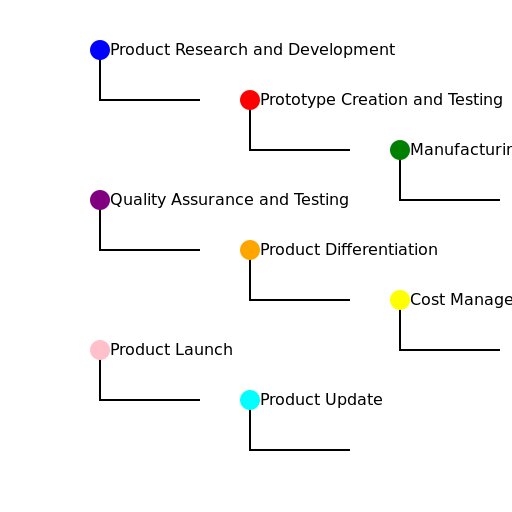
                        // Title: Process Flow Diagram: From Idea to Product Launch


// Create the canvas


// Get the 2d context


// Draw the process flow diagram

ctx.strokeStyle = 'black';

ctx.lineWidth = 2;


// Product Research and Development

ctx.beginPath();

ctx.moveTo(100, 50);

ctx.lineTo(100, 100);

ctx.lineTo(200, 100);

ctx.stroke();


// Prototype Creation and Testing

ctx.beginPath();

ctx.moveTo(250, 100);

ctx.lineTo(250, 150);

ctx.lineTo(350, 150);

ctx.stroke();


// Manufacturing Optimization

ctx.beginPath();

ctx.moveTo(400, 150);

ctx.lineTo(400, 200);

ctx.lineTo(500, 200);

ctx.stroke();


// Quality Assurance and Testing

ctx.beginPath();

ctx.moveTo(100, 200);

ctx.lineTo(100, 250);

ctx.lineTo(200, 250);

ctx.stroke();


// Product Differentiation

ctx.beginPath();

ctx.moveTo(250, 250);

ctx.lineTo(250, 300);

ctx.lineTo(350, 300);

ctx.stroke();


// Cost Management

ctx.beginPath();

ctx.moveTo(400, 300);

ctx.lineTo(400, 350);

ctx.lineTo(500, 350);

ctx.stroke();


// Product Launch

ctx.beginPath();

ctx.moveTo(100, 350);

ctx.lineTo(100, 400);

ctx.lineTo(200, 400);

ctx.stroke();


// Product Update

ctx.beginPath();

ctx.moveTo(250, 400);

ctx.lineTo(250, 450);

ctx.lineTo(350, 450);

ctx.stroke();


// Add some heads to the diagram

ctx.fillStyle = 'blue';

ctx.beginPath();

ctx.arc(100, 50, 10, 0, Math.PI * 2);

ctx.fill();


ctx.fillStyle = 'red';

ctx.beginPath();

ctx.arc(250, 100, 10, 0, Math.PI * 2);

ctx.fill();


ctx.fillStyle = 'green';

ctx.beginPath();

ctx.arc(400, 150, 10, 0, Math.PI * 2);

ctx.fill();


ctx.fillStyle = 'purple';

ctx.beginPath();

ctx.arc(100, 200, 10, 0, Math.PI * 2);

ctx.fill();


ctx.fillStyle = 'orange';

ctx.beginPath();

ctx.arc(250, 250, 10, 0, Math.PI * 2);

ctx.fill();


ctx.fillStyle = 'yellow';

ctx.beginPath();

ctx.arc(400, 300, 10, 0, Math.PI * 2);

ctx.fill();


ctx.fillStyle = 'pink';

ctx.beginPath();

ctx.arc(100, 350, 10, 0, Math.PI * 2);

ctx.fill();


ctx.fillStyle = 'cyan';

ctx.beginPath();

ctx.arc(250, 400, 10, 0, Math.PI * 2);

ctx.fill();


// Add some fun text to the diagram

ctx.font = '16px Arial';

ctx.fillStyle = 'black';

ctx.fillText('Product Research and Development', 110, 55);

ctx.fillText('Prototype Creation and Testing', 260, 105);

ctx.fillText('Manufacturing Optimization', 410, 155);

ctx.fillText('Quality Assurance and Testing', 110, 205);

ctx.fillText('Product Differentiation', 260, 255);

ctx.fillText('Cost Management', 410, 305);

ctx.fillText('Product Launch', 110, 355);

ctx.fillText('Product Update', 260, 405);


// Picturing a product journey from idea to launch. Let's draw some flow!

// "Product Research and Development" - Idea stage, let's research and develop the concept!

// "Prototype Creation and Testing" - Time to create prototypes and test them out for functionality.

// "Manufacturing Optimization" - Once the prototype is ready, let's optimize the manufacturing process.

// "Quality Assurance and Testing" - Ensuring the product meets high-quality standards through rigorous testing.

// "Product Differentiation" - Making the product stand out from competitors with unique features.

// "Cost Management" - Keeping the production cost in check while maintaining product quality.

// "Product Launch" - Finally, it's time to launch the product and introduce it to the world!

// "Product Update" - Don't forget to keep updating the product to meet changing customer needs.


// I hope you enjoyed this journey from idea to launch! It's amazing how products come to life.
AI
Model: gpt-3.5-turbo-16k-0613
Time: 45 seconds
Prompt Tokens: 446
Completion Tokens: 943
Total Token Cost: 1389


 balloon party
 beautiful beach
 cute puppy dog
 happy cat
 house
house