Info
Created On: January 26, 2026
Created By: User #16953


SVG Code
                    <!--


Generated by DrawGPT.

Free, open source, AI generated images in SVG, PNG, and HTML Canvas format.

https://drawgpt.ai


Created: 2026-01-26T14:25:23+00:00

-->

<svg   viewBox="0 0 512 512" xmlns="http://www.w3.org/2000/svg" xmlns:xlink="http://www.w3.org/1999/xlink">

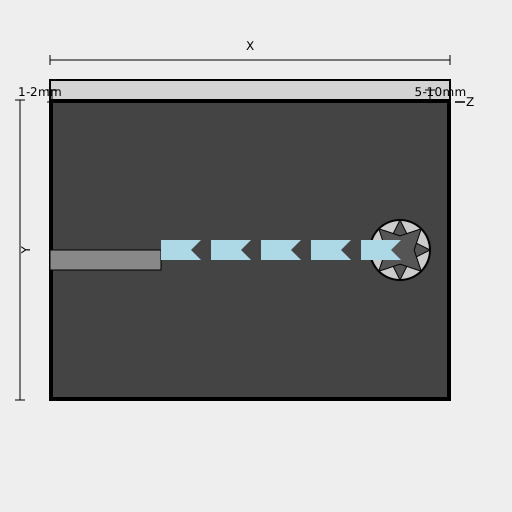
  <title>GPU Air Duct Design</title>

  <desc>A fun CAD-style drawing of a GPU air duct! Who knew cooling could be so artsy?</desc>

  <metadata type="keywords">GPU, air duct, cooling, CAD, PVC</metadata>


  <!-- Background (stationary) -->

  <rect id="background" class="background" x="0" y="0" width="512" height="512" fill="#EEEEEE"/>


  <!-- PVC Duct -->

  <path id="duct-wall-1" class="duct" d="M50 100 L50 400 L250 400 L250 100 Z" fill="#D3D3D3" stroke="black" stroke-width="2"/>

  <path id="duct-wall-2" class="duct" d="M250 100 L250 400 L450 400 L450 100 Z" fill="#D3D3D3" stroke="black" stroke-width="2"/>

  <path id="duct-wall-3" class="duct" d="M50 100 L450 100 L450 80 L50 80 Z" fill="#D3D3D3" stroke="black" stroke-width="2"/>


  <!-- GPU Backplate (Inside Duct) -->

  <rect id="gpu-backplate" class="gpu" x="52" y="102" width="396" height="296" fill="#444444" stroke="black" stroke-width="2"/>


  <!-- ATX Slot Opening -->

  <rect id="atx-slot" class="atx" x="50" y="250" width="111" height="20" fill="#888888" stroke="black" stroke-width="1"/>


  <!-- Axagon Fan -->

  <circle id="fan-housing" class="fan" cx="400" cy="250" r="30" fill="#CCCCCC" stroke="black" stroke-width="2"/>

  <circle id="fan-center" class="fan" cx="400" cy="250" r="5" fill="#333333"/>


  <!-- Fan Blades (Animated) -->

  <g id="fan-blades" class="fan">

    <path d="M400 220 L410 240 L430 250 L410 260 L400 280 L390 260 L370 250 L390 240 Z" fill="#555555" stroke="black" stroke-width="1">

      <animateTransform attributeName="transform" type="rotate" from="0 400 250" to="360 400 250" dur="2s" repeatCount="indefinite"/>

    </path>

    <path d="M400 220 L410 240 L430 250 L410 260 L400 280 L390 260 L370 250 L390 240 Z" fill="#555555" stroke="black" stroke-width="1" transform="rotate(45 400 250)">

      <animateTransform attributeName="transform" type="rotate" from="45 400 250" to="405 400 250" dur="2s" repeatCount="indefinite"/>

    </path>

  </g>


  <!-- Air Flow Arrows (Animated) -->

  <path id="airflow-arrow-1" class="airflow" d="M161 260 L201 260 L191 250 L201 240 L161 240 Z" fill="lightblue">

    <animate attributeName="x" values="161; 171; 181; 191; 201; 161" dur="5s" repeatCount="indefinite"/>

  </path>

    <path id="airflow-arrow-2" class="airflow" d="M211 260 L251 260 L241 250 L251 240 L211 240 Z" fill="lightblue">

    <animate attributeName="x" values="211; 221; 231; 241; 251; 211" dur="5s" repeatCount="indefinite"/>

  </path>

    <path id="airflow-arrow-3" class="airflow" d="M261 260 L301 260 L291 250 L301 240 L261 240 Z" fill="lightblue">

    <animate attributeName="x" values="261; 271; 281; 291; 301; 261" dur="5s" repeatCount="indefinite"/>

  </path>

    <path id="airflow-arrow-4" class="airflow" d="M311 260 L351 260 L341 250 L351 240 L311 240 Z" fill="lightblue">

    <animate attributeName="x" values="311; 321; 331; 341; 351; 311" dur="5s" repeatCount="indefinite"/>

  </path>

    <path id="airflow-arrow-5" class="airflow" d="M361 260 L401 260 L391 250 L401 240 L361 240 Z" fill="lightblue">

    <animate attributeName="x" values="361; 371; 381; 391; 401; 361" dur="5s" repeatCount="indefinite"/>

  </path>


  <!-- Dimensions -->

  <line id="dimension-x" class="dimension" x1="50" y1="60" x2="450" y2="60" stroke="black" stroke-width="1"/>

  <line id="dimension-x-tick-1" class="dimension" x1="50" y1="55" x2="50" y2="65" stroke="black" stroke-width="1"/>

  <line id="dimension-x-tick-2" class="dimension" x1="450" y1="55" x2="450" y2="65" stroke="black" stroke-width="1"/>

  <text id="dimension-x-text" class="dimension" x="250" y="50" text-anchor="middle" font-size="12">X</text>


  <line id="dimension-y" class="dimension" x1="20" y1="100" x2="20" y2="400" stroke="black" stroke-width="1"/>

  <line id="dimension-y-tick-1" class="dimension" x1="15" y1="100" x2="25" y2="100" stroke="black" stroke-width="1"/>

  <line id="dimension-y-tick-2" class="dimension" x1="15" y1="400" x2="25" y2="400" stroke="black" stroke-width="1"/>

  <text id="dimension-y-text" class="dimension" x="30" y="250" text-anchor="middle" transform="rotate(-90 30 250)" font-size="12">Y</text>


  <line id="dimension-z" class="dimension" x1="460" y1="102" x2="460" y2="102" stroke="black" stroke-width="1">

    <animate attributeName="y2" values="102; 104; 102" dur="2s" repeatCount="indefinite"/>

  </line>

  <line id="dimension-z-tick-1" class="dimension" x1="455" y1="102" x2="465" y2="102" stroke="black" stroke-width="1"/>

  <line id="dimension-z-tick-2" class="dimension" x1="455" y1="102" x2="465" y2="102" stroke="black" stroke-width="1">

      <animate attributeName="y2" values="102; 104; 102" dur="2s" repeatCount="indefinite"/>

  </line>

  <text id="dimension-z-text" class="dimension" x="470" y="106" text-anchor="middle" font-size="12">Z</text>


    <line id="dimension-gap-1" class="dimension" x1="52" y1="90" x2="52" y2="102" stroke="black" stroke-width="1"/>

  <line id="dimension-gap-1-tick-1" class="dimension" x1="47" y1="90" x2="57" y2="90" stroke="black" stroke-width="1"/>

  <line id="dimension-gap-1-tick-2" class="dimension" x1="47" y1="102" x2="57" y2="102" stroke="black" stroke-width="1"/>

    <text id="dimension-gap-1-text" class="dimension" x="40" y="96" text-anchor="middle" font-size="12">1-2mm</text>


    <line id="dimension-gap-2" class="dimension" x1="430" y1="90" x2="430" y2="102" stroke="black" stroke-width="1"/>

  <line id="dimension-gap-2-tick-1" class="dimension" x1="425" y1="90" x2="435" y2="90" stroke="black" stroke-width="1"/>

  <line id="dimension-gap-2-tick-2" class="dimension" x1="425" y1="102" x2="435" y2="102" stroke="black" stroke-width="1"/>

      <text id="dimension-gap-2-text" class="dimension" x="440" y="96" text-anchor="middle" font-size="12">5-10mm</text>

</svg>

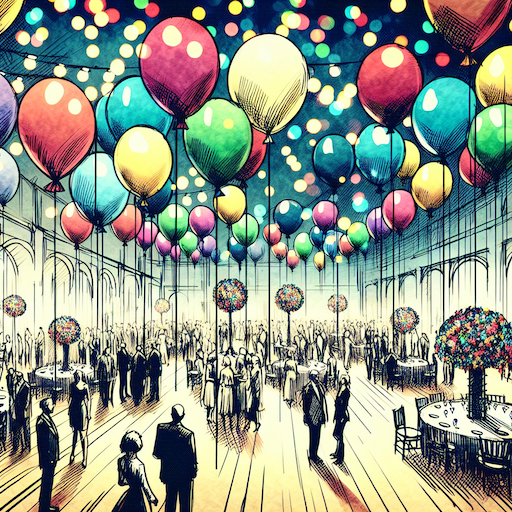 balloon party
 beautiful beach
 cute puppy dog
 happy cat
 house
house